Showing posts with label ListView. Show all posts
Showing posts with label ListView. Show all posts
Monday, December 5, 2011

Tuesday, August 30, 2011
Get Process List and Display to Combobox, Listbox, and Listview
This program will show you how to display all processes in a combobox, a listbox, and a listview.
Monday, August 1, 2011
Export Listview to CSV
If you want to export the Listview Data to CSV in Visual Basic 2010 use the function bellow:
Function ExportListview2Excel(ByVal lstview As ListView) As Boolean
Dim csvFileContents As New System.Text.StringBuilder
Dim CurrLine As String = String.Empty
For columnIndex As Int32 = 0 To lstview.Columns.Count - 1
CurrLine &= (String.Format("{0};", lstview.Columns(columnIndex).Text))
Next
csvFileContents.AppendLine(CurrLine.Substring(0, CurrLine.Length - 1))
CurrLine = String.Empty
For Each item As ListViewItem In lstview.Items
For Each subItem As ListViewItem.ListViewSubItem In item.SubItems
CurrLine &= (String.Format("{0};", subItem.Text))
Next
csvFileContents.AppendLine(CurrLine.Substring(0, CurrLine.Length - 1))
CurrLine = String.Empty
Next
Dim Sys As New System.IO.StreamWriter("C:\Test.csv")
Sys.WriteLine(csvFileContents.ToString)
Sys.Flush()
Sys.Dispose()
End Function
Monday, July 25, 2011
Populate Listview
If you use Microsoft Access 2003 as a database, Microsoft.ACE.OLEDB.12.0 as a Provider and Listview as a Form control, to populate the Listview after the connecting then you can use the function bellow:
Public Sub Connect_database()
Try
With connection
If .State = ConnectionState.Open Then .Close()
.ConnectionString = "Provider=Microsoft.ACE.OLEDB.12.0;Data Source=Contacts.mdb"
.Open()
End With
Catch ex As Exception
MessageBox.Show("Not connected", "Error", MessageBoxButtons.OK, MessageBoxIcon.Error)
Application.Exit()
End Try
End Sub
Determine the selected Item in Listview
Dim selectedItem As ListViewItem
If ListView1.SelectedItems.Count > 0 Then
selectedItem = ListView1.SelectedItems(0)
Else
selectedItem = Nothing
End If
Add Columns to the Listview Control
' Details view
        ListView1.View = View.Details
        ' Add a column with width 50 and left alignment
        ListView1.Columns.Add("File type", 50, HorizontalAlignment.Left)
Saturday, July 23, 2011
Populate Listview
If you use Microsoft Access 2003 as a database, Microsoft.ACE.OLEDB.12.0 as a Provider and Listview as a Form control, to populate the Listview after the connecting then you can use the function bellow:
Public Sub Connect_database()
Try
With connection
If .State = ConnectionState.Open Then .Close()
.ConnectionString = "Provider=Microsoft.ACE.OLEDB.12.0;Data Source=Contacts.mdb"
.Open()
End With
Catch ex As Exception
MessageBox.Show("Not connected", "Error", MessageBoxButtons.OK, MessageBoxIcon.Error)
Application.Exit()
End Try
End Sub
Tuesday, June 28, 2011
ListView Export and Import items
This tutorial shows step by step how to import and export items in Listview using Visual Basic 2008 or Visual Basic 2010. On the tutorial is shown the all procedure:
Tuesday, May 17, 2011
Oledb & Listview & Microsoft Access 2003
This project is developed to show you practically how to manipulate Visual Basic 2010 project and Microsoft Access 2003. The functions here are Add, Edit and Delete record. The populating is made in ListView control. The connection adapter used here is Microsoft.Ace.Oledb.12.
Friday, May 13, 2011
Populate Listview
If you use Microsoft Access 2003 as a database, Microsoft.ACE.OLEDB.12.0 as a Provider and Listview as a Form control, to populate the Listview after the connecting then you can use the function bellow:
Public Sub Connect_database()
Try
With connection
If .State = ConnectionState.Open Then .Close()
.ConnectionString = "Provider=Microsoft.ACE.OLEDB.12.0;Data Source=Contacts.mdb"
.Open()
End With
Catch ex As Exception
MessageBox.Show("Not connected", "Error", MessageBoxButtons.OK, MessageBoxIcon.Error)
Application.Exit()
End Try
End Sub
Determine the selected Item in Listview
Dim selectedItem As ListViewItem
If ListView1.SelectedItems.Count > 0 Then
selectedItem = ListView1.SelectedItems(0)
Else
selectedItem = Nothing
End If
Friday, May 6, 2011
Count the Items in Listview
Create a form like on the picture

In the button "Count items" write the code:
MsgBox(ListView1.Items.Count & " items")
Remove All Items In Listview
Create a form like on the picture bellow:
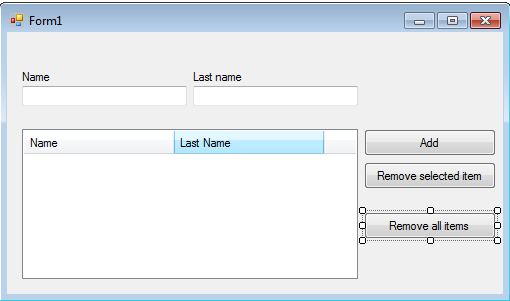
In to the button "Remove all items" write the code:
ListView1.Items.Clear()
Remove Selected Item from Listview
Create a form like on the picture bellow:

Write the code into the Button "Remove selected item"
ListView1.Items.RemoveAt(ListView1.SelectedItems(0).Index)
Add Item in Listview
Create a form like on the picture bellow:


In the button named "Add" writhe the code:
Dim item As New ListViewItem(TextBox1.Text)
item.SubItems.Add(TextBox2.Text)
ListView1.Items.Add(item)
Subscribe to:
Posts (Atom)