This program will show you how to display all processes in a combobox, a listbox, and a listview.
Showing posts with label ListBox. Show all posts
Showing posts with label ListBox. Show all posts
Tuesday, August 30, 2011

Friday, May 13, 2011
Friday, April 29, 2011
Save ListBox Using SaveDialog
To save ListBox items using the SaveDialog you should write the code bellow:
Dim dialog As New SaveFileDialog
dialog.Filter = "Text files (*.txt)|*.txt"
dialog.FilterIndex = 2
If dialog.ShowDialog() = DialogResult.OK Then
Dim output As New IO.StreamWriter(dialog.FileName)
For Each item As Object In ListBox1.Items
output.WriteLine(ListBox1.GetItemText(item))
Next item
output.Close()
End If
Search Item in ListBox
Create a form like on the picture bellow:

In to the button "Search" write the code bellow:
Dim theList As Long
Dim textToSearch As String
Dim theListText As String
textToSearch = LCase(TextBox1.Text)
For theList = 0 To ListBox1.Items.Count - 1
theListText = LCase(ListBox1.Items.Item(theList))
If theListText = textToSearch Then ListBox2.Items.Add(textToSearch)
Next
Select Newly Added Item in Listbox
Create a form like on the picture bellow:
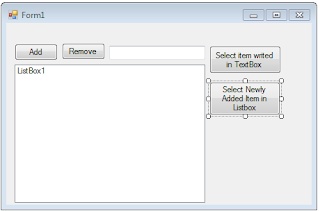
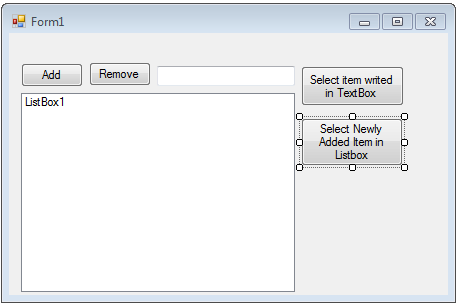
In to the selected button write the code bellow:
Dim selecteditem As Integer = ListBox1.Items.Add(TextBox1.Text)
ListBox1.SetSelected(selecteditem, True)
Select Item in ListBox writes in TextBox
Create a form like on the picture bellow:


In to the selected button "Selected item writes in TextBox" enter the code bellow:
ListBox1.SelectedIndex = ListBox1.FindStringExact(TextBox1.Text)
You will get this result:

Remove Item From ListBox
Create a form like on the picture bellow:
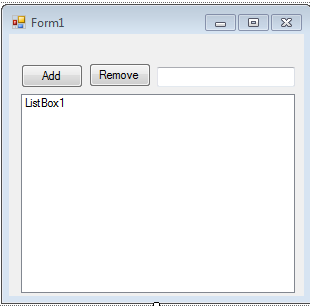
For the button "Remove" write the code bellow:
ListBox1.Items.Remove(ListBox1.SelectedItem)
Thursday, April 28, 2011
Add Items To ListBox from TexBox
Create form like on the picture bellow:

For the button "Add" write the code bellow:
ListBox1.Items.Add(TextBox1.Text)
Add Item To ListBox
Create form like on the picture bellow:

For the button "Add" write the code bellow:
ListBox1.Items.Add("Item1")
Subscribe to:
Posts (Atom)